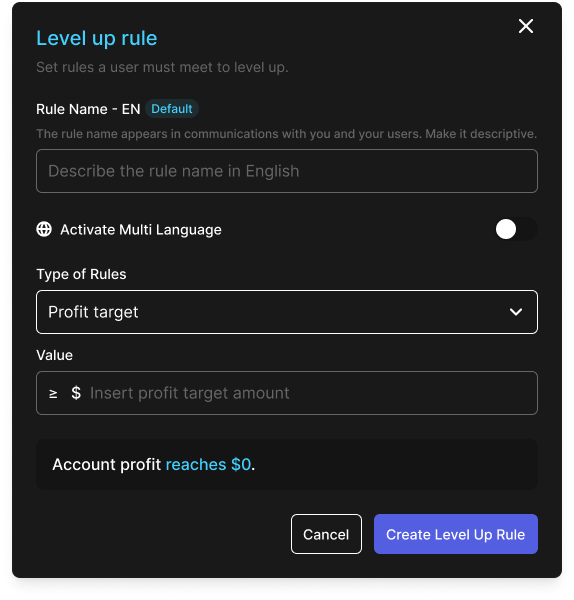
# Level-up Rules
The **Level-up Rules** section defines the conditions required for an account to progress to the next phase within a program. These rules allow proprietary trading firms to control how users advance based on specific trading achievements.
This section includes two key rule types: **Minimum Trading Days** and **Profit Target**.
## Profit Target
Specifies the minimum profit a trader must achieve to qualify for the next level. This can be defined as a fixed amount (e.g., $5,000) or as a percentage of the initial balance (e.g., 10%).
**Example**: `Account profit reaches $5,000`
**Example**: `Account profit reaches 10% of initial balance`
## Minimum Trading Days
The **Level Up Minimum Trading Days** defines the minimum number of unique trading days required. Helps ensure consistency rather than one-time performance.
**Example**: `Trading days must exceed or equal 10 days`
## Minimum Profitable Trading Days
The **Level Up Minimum Profitable Trading Days** requires a minimum number of trading days where the trader ends the day with a specific percentage profit. Supports more refined consistency rules.
**Example**: `Profitable trading days must exceed or equal 20 days, with profit 5% of initial balance daily`
## Daily Profit Consistency
The **Level Up Daily Profit Consistency** rule ensures that no single day's profit contributes disproportionately to the total account profit. This rule promotes sustainable trading practices and prevents level-up eligibility based on solely on one high-risk, high-reward day.
Formula:
```
Daily Profit Consistency (%) = (Daily Highest Profit / Total Account Profit) × 100%
```
## Extra Configuration
These options define how the system handles the level-up once all conditions are met.
### Enable Level Up
Toggle to enable or disable the level-up functionality for the current program.
To setup program next phase:
* **Next Program** - Select the target program where the user will be moved after leveling up.
* **Automatically Upgrade Account** - If enabled, the system will perform the upgrade automatically once all criteria are fulfilled.
* **Review on Upgrade** - If enabled, upgrades will require administrator review and approval before proceeding. The account status will be **Upgrade Pending**.
### Certificate After Upgrade
Toggle to automatically send a certificate to users when their account is **upgraded** under this program. Once enabled:
* Choose the certificate template from a dropdown (must be created beforehand in the **Certificate** page).
* Optionally set a custom **Certificate Program** **Name** to override the default program name shown in the certificate.
* The certificate will be generated in PNG format and sent via email to the user.