> For the complete documentation index, see [llms.txt](https://yourpropfirm.gitbook.io/yourpropfirm-docs/llms.txt). Markdown versions of documentation pages are available by appending `.md` to page URLs; this page is available as [Markdown](https://yourpropfirm.gitbook.io/yourpropfirm-docs/administrator/payouts.md).
# Payouts
The **Payouts** page provides an administrative record of all payout requests submitted by traders on the platform.
{% hint style="success" %}
This page is for internal tracking and manual handling. It does **not** process transaction or connect to any third-party payment systems. Final payouts must be completed externally by administrators.
{% endhint %}
## Overview
Each payout request is listed in a table, giving administrators the ability to view, track, and update the request status.
The table includes the following columns:
### User
Displays the trader's information:
* **Trading Account Login**
* **Full Name**
* **Email Address**
### Requested On
The date and time the payout was requested, shown based on the admin's local machine time.
### Status
Indicates the current status of the payout request:
* **Pending** - Awaiting review.
* **Approved** - Manually approved by admin; internal actions (like account balance deduction or reset) have been triggered.
* **Rejected** - Denied by admin with reason provided.
### Type
Shows the method of payout requested. Types include:
* **Bank Transfer** - Includes account name, number, BIC/SWIFT (auto-generated), and bank name (auto-generated).
* **USDT TRC20 Wallet** - USDT on the TRC20 blockchain.
* **USDT ERC20 Wallet** - USDT on the ERC20 blockchain.
* **BTC Wallet** - Bitcoin address.
* **ETH Wallet** - Ethereum address.
* **Email** - Payouts via platforms that use email as identifier.
* **Rise** - Payment via the Rise payment service.
* **Wise** - Payment via the Wise platform.
### Amount
Gross amount requested before profit split calculations.
### Transaction Details
Displays destination or account information for the payout (e.g., wallet address, bank details).
## Approving Payout
When selecting **Approve**, administrators will be shown a modal with complete payout details:
* Payout info (user, account ID, requested amount, type, profit split, net expense).
* Option to toggle **Custom Net Expense** and input a manual amount.
* Confirmation field to re-enter the exact custom net expense to prevent errors.
{% hint style="warning" %}
**Note**
Approving a payout does not initiate any real transfer. It triggers backend rules such as deducting the account balance or resetting the user's account depending on the program's settings.
{% endhint %}
An email notification will be sent to the trader upon approval.
## Rejecting Payout
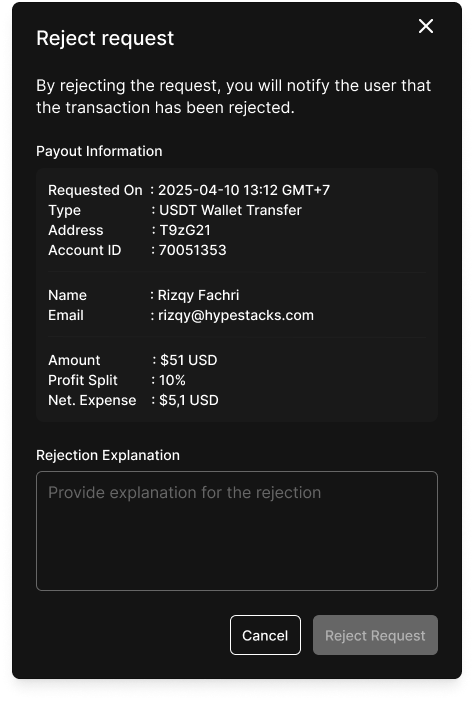
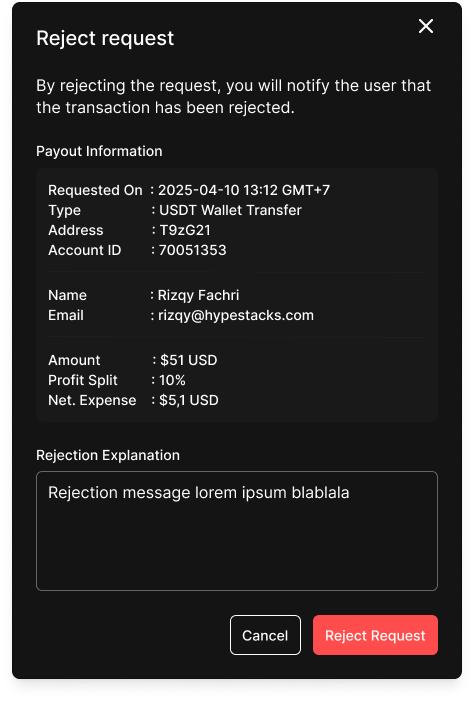
When selecting **Reject**, a modal will prompt the admin to enter a **rejection reason**.
After confirmation, the trader is notified via email with the provided reason.
%20-%20default.png?alt=media&token=147795d3-ccff-4140-a473-4d8d7a34d41f)
.png?alt=media&token=e95d06c5-ba3b-4344-989a-2714dc14e5c9)
.png?alt=media&token=9218660a-d892-47eb-a03e-b9d5bacbef10)