# Users Analytics
The **Users Analytics** module focuses on understanding user demographics, growth trends, and access behavior.
## User Demographics Visualization
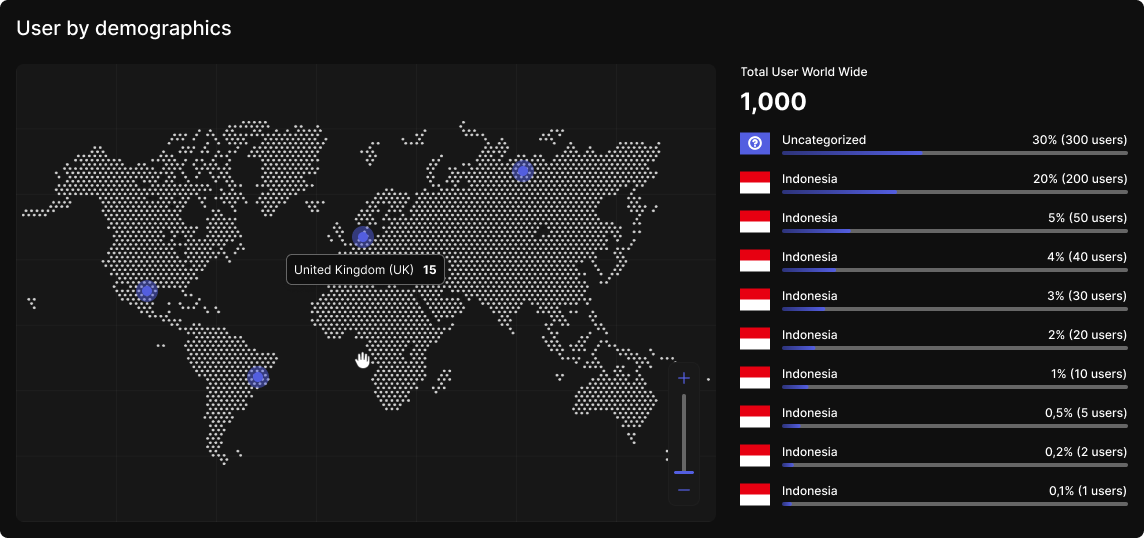
An interactive world map visualizes user distribution by country. Each location is represented with dot sizes proportional to total users.
Hovering on a country reveals:
* Country name
* Total user count
* Percentage of total users globally
A bar char next to the map ranks the **Top 10 countries** based on user percentage.
## New User Registration Analytics
A line graph displays new user registrations using the `createdAt` timestamp from user records.
Filter options:
* **Daily**: Last 7 days
* **Weekly**: Last 7 weeks
* **Monthly**: Last 7 months
Only 7 data points are shown at a time to maintain clarity and relevance.
## User Sign-In Tracking Analytics
A separate line graph visualizes daily sign-ins based on unique IP address entries. It triggered when a new IP address is detected for a user.
It applies the same filter as above (Daily, Weekly, Monthly).
## User IP Address Records
This section logs the IP addresses used to access the platform across all user accounts. It helps detect suspicious activity, such as shared access patterns, and supports fraud prevention efforts. Admins can view a user's login history, including timestamps and associated IPs, and identify if the same IP is used by multiple accounts.
A tabular section contains section-level access data:
| Column | Description |
| ------------------ | --------------------------------- |
| **User** | Display name or username |
| **IP Address** | Last recorded IP address |
| **IP Country** | Geolocation-based country |
| **Last Signed In** | Most recent login timestamp (UTC) |
| **Created** | User registration timestamp (UTC) |
{% hint style="info" %}
Records older than **3 months** will be automatically deleted from the backend table.
{% endhint %}